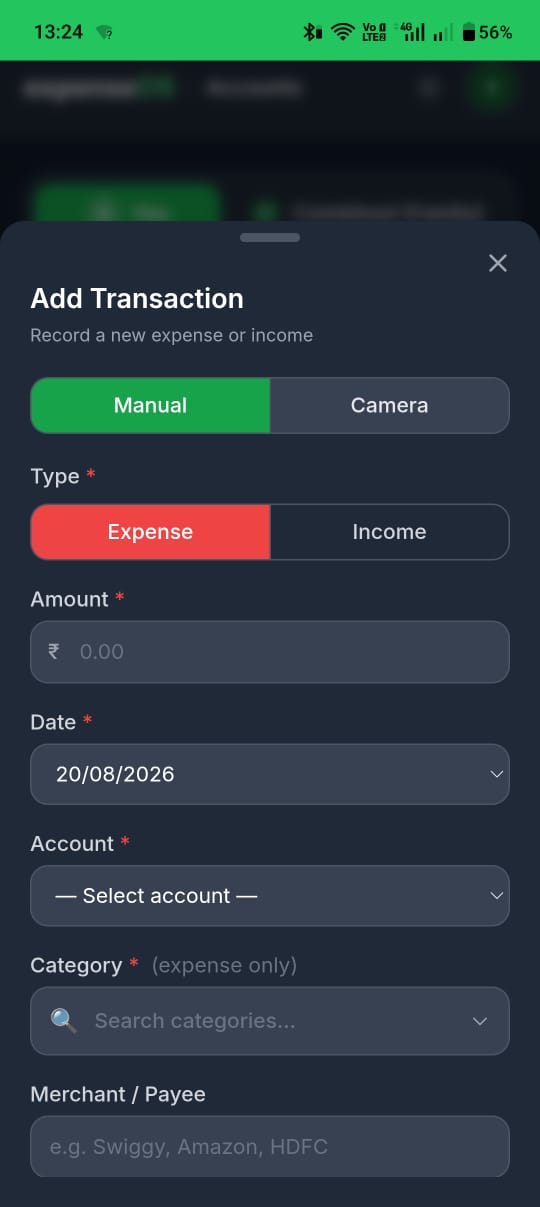
Add a transaction
Log an expense in under a minute.
Written by Sumiet · Updated
This is the daily move.
Boring? Yes. Powerful? Hell, Yes!
- On mobile, tap the green + FAB (bottom-right). On desktop, use Add Transaction on the Transactions page.
- Choose expense or income, see transfer.
- Enter Amount, category, merchant, account (note and tag if you want).
- Save. Your account balance updates.
Tap Trxcns in the bottom nav to search, filter by month, or open a row.
💡 Same merchant every time helps Finie group spends. “Swiggy” beats groceries??”.
List of Categories
Pick the parent that fits, then the most specific subcategory. These are the built-in categories in expenseOS — designed comprehensively for everyday spending and kept consistent so Finie, budgets, and charts stay accurate.
Expense categories 12 groups
Food & Dining
- Groceries
- Vegetables
- Fruits
- Dairy
- Eggs
- Bakery
- Alcohol
- Party
- Snacks
- Breakfast
- Lunch
- Dinner
- Desserts
- Healthy
- Restaurant
- Food Delivery
- Meal Subscription
- Street Food
- Meat
- Chicken
- Seafood
Transport & Travel
- Fuel
- Metro
- Bus
- Train
- Rickshaw
- Cab
- Flight
- Toll
- Parking
- Packer & Mover
- Hotel Stay
Lifestyle & Shopping
- Apparel
- Accessories
- Electronics
- Home Decor
- Furniture
- Home Interior
- Stationery
- Sport
- Gifting
- Jewellery
- Online Subscription
- Domestic Help
- Babysitting
- Baby Care
- Gardening
- Deep Cleaning
- Pet Care
- Pet Food
- Pet Insurance
- Domestic Outing
- International Trip
- Cinema
- Concert
- Theatre
- Museum
- Park
- Library
- Club
- Gaming
- Celebration
- Camera & Video Gear
- Music & Instruments
- Dating and Relationships
- Other Shopping
Bills & Utilities
- Electricity
- Water
- Mobile
- Internet
- Cooking Gas
- DTH
- Cable TV
- Term Insurance
- Life Insurance
- Laundry
- Tailoring
- Courier
- Hardware
- Labour Services
- Electronics Rent
- Furniture Rent
- Other Rent
- Pest Control
- License
- Permit
- Registration Charges
- Bank Charges
- Penalties
- Income Tax
- Other Tax
- Other Bills
Healthcare & Medical
- Doctor Consultation
- Medicines
- Diagnostics
- Health Insurance
- Medicine Subscription
- Health Checkup
- Vitamin Supplements
Assets & Vehicles
- Vehicle Purchase
- Vehicle Loan EMI
- Vehicle Maintenance
- Vehicle Insurance
- Vehicle Accessories
- Vehicle Registration
- Vehicle Tax
- Vehicle Repair
- Investment Property Purchase
- Investment Property Loan EMI
- Investment Property Maintenance
- Investment Property Insurance
- Investment Property Tax
- Investment Property Repair
Education & Self-help
- School Fees
- College Fees
- Tuition Fees
- School Supplies
- College Supplies
- Education Loan EMI
- Online Course
- Degree
- Diploma
- Course Subscription
- Coaching
- Book
- Magazine
- Newspaper
- Exam
- Certification
Personal Care & Fitness
- Salon
- Grooming
- Personal Care Products
- Beauty Products
- Health Supplements
- Fitness
- Spa
- Wellness
- Gym
- Dental Care
- Eye Care
- Skin Care
- Hair Care
Home & Accommodation
- Rent
- Society Charges
- Society Maintenance
- Home Loan EMI
- Home Purchase
- Home Maintenance
- Home Insurance
- Home Repair
- Home Renovation
- Home Property Tax
- Security Deposit
- Lease Agreement
Investment & Lendings
- SIP
- MF
- FD
- RD
- PPF
- NPS
- ELSS
- Tax Saving Investment
- Stock
- Security
- Crypto
- Digital Asset
- Digital Gold
- Money Lent
- Donation
- Charity
- Social Contribution
- Real Estate
Business & Hustle
- Office Supplies
- Work Expense
- Software
- SaaS
- PaaS
- ERP
- CRM
- HRM
- PoS
- Tools
- API Service
- Domain Service
- Hosting Service
- Cloud Service
- Data Service
- Storage Service
- Database Service
- AI Service
- Automation Service
- Marketing
- Advertising
- Professional Services
- Business Travel
- Employee Salary
- Freelancer Payment
- Consulting Payment
- Business Loan EMI
- Business Utilities
- Business Bills
- Business Subscription
Miscellaneous & Others
- Missing
- Outside expenseOS
Income categories 1 group
Income & Returns
- Salary
- Wages
- Investment Returns
- Freelancing
- Consulting Service
- Business Income
- Rental Income
- Interest Income
- Dividend
- Bonus
- Incentive
- Gift
- Windfall
- Grant
- Scholarship
- Borrowing
- Refund
- Cashback
- Reimbursement
- Other Income
Need a category or subcategory that is not listed? Email sumiet@expenseos.app with the name you want and a one-line example (e.g. “Pet grooming under Personal Care”). We review requests for the shared catalog.
💡 For logging habits that keep Finie sharp, see Recurring transactions and Accurate and consistent logging.
App Screenshot