
Credit Card Equaliser
Credit card overspending is a real thing. Tame the horse now!
Written by Sumiet · Updated
Multiple credit cards, one salary? Easy to overspend; hard to pay the bills.
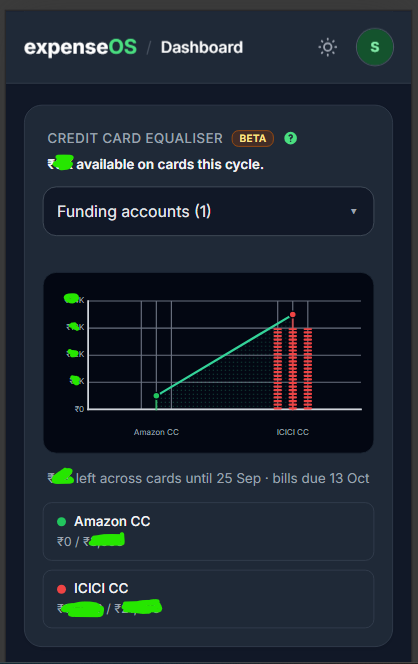
The Credit Card Equaliser in expenseOS estimates remaining card room (different from your credit card limit) until your latest card payment due, against money already in selected debit accounts plus income still to arrive, after what you already owe on cards and bills you still have to pay. It does not block transactions. It is a visual estimate only.
Note: The main purpose of this tool is to limit credit card overspendings.
Where to find it
After you add at least one credit card on Accounts, the equaliser appears on Home above 6-Month Cashflow. Without a credit card account, the dashboard does not show this section. Tap the green ? next to the title for a one-line summary, or read this guide for detail.
Two windows
The widget uses two dates, not one:
- Statement close — upcoming card bills that still sit on the card (a payment this cycle counts; another payment after cycle close is the next card cycle).
- Payment due — income on selected funding accounts until the latest card due date (October salary counts when a card is due mid-October).
Debit bills (EMI, rent) on all personal funding accounts count through the last income in that due window — including bills on an account you did not select as CC funding. A debit due after that payday rolls to the next cycle. If there is no income in the window, debit bills run through the latest payment due.
Disposable pool
Leftover swipe room is:
selected debit balances + selected income until payment due − already on cards − this-statement card recurring − all personal funding-account bills until last income − selected goals’ remaining monthly contributions in that same window
That leftover is split equally across your cards. The headline “₹X available on cards this cycle” is this combined remaining.
The headline “₹X short this cycle” is selected cash and income minus those obligatory bills and card balances the pool cannot cover. Unselecting a savings-corpus account does not hide its linked upcoming expenses.
Spent, cap, and “left”
Each card chip shows spent / cap:
- Spent — amount owed on that card (negative ledger, whole rupees). A positive card balance is a credit — spent is ₹0, not abs(balance). Unposted card recurring is not added to the chip; it only shrinks leftover room.
- Cap — spent plus your equal share of leftover disposable. If nothing is left, cap is not the amount you already owe. A ₹0 pool shows a ₹0 cap — existing card balances appear as overshoot. Overshoot is marked OVER on that card’s bars, and the chip says how much it went over.
If ₹25,285 is left across three cards, each gets about ₹8,428 more room on top of what is already owed.
The footer line “₹X left across cards until …” is the combined remaining pocket until the latest payment due — one shared number, not per card. Statement close is shown as secondary.
How to read the chart
The chart compares what you already owe on each card (bars) with each card’s equaliser cap (dots and connecting line). The Y-axis is rupees in compact form (e.g. ₹12K). The top of the scale is the tallest bar or cap on the chart, so tick labels shrink or grow as spend and caps change. It is not scaled to leftover total or to the sum of every card’s spend.
| Visual | Meaning |
|---|---|
| LED columns | Spent — amount owed on that card (same as the chip’s first number). Taller = more outstanding. |
| Faint grey LEDs above spent | Leftover room on that card — the equal slice of disposable leftover, from spent up to the cap. Always grey (not green/indigo/red), so unused cards are not mistaken for spend. While leftover remains, these gaps are the same height on every card. The total leftover is the footer, not a chart line. |
| Dot on each card | Cap for that card (spent plus your equal share of leftover room — same as the chip’s second number). |
| Line joining the dots | How caps line up across cards. Green when every card is at or below its cap. Red when at least one card has overshot its cap. |
| Coloured stem (dot down to the axis) | Same colour as that card’s bars — links the cap to the baseline. |
| Pink hatched band + OVER | On a card where spent is above cap. The band sits between the cap and the top of the spent bars. |
| Short solid red tick on a column | That card’s cap level when it is in overshoot (easier to see than the dot alone). |
Bar and chip colours
Colours reuse the same rules as budget meters (spent vs that card’s cap):
- Green — under about 31% of the cap used (lots of room left on that card).
- Indigo — about 31%–79% of the cap used.
- Red — about 80%+ of the cap used, or over the cap (overshoot).
The small dot beside each card name in the chips uses the same green / indigo / red.
Quick visual checks
- If the connecting line is red or you see OVER, at least one card has spent more than its equaliser cap — check the chips for Overshot ₹….
- Caps can differ in height because spent differs; the extra slice of disposable room is split equally across cards, so the gap from spent to cap (remaining on that card) is the same for each card while you still have leftover pool.
Funding accounts
Use Funding Accounts to pick which debit balances and income count toward swipe room — typically the account you actually pay cards from, not a savings corpus. Obligatory debit bills on other personal funding accounts still reduce the pool; those payments will happen anyway. Household shared pots are excluded. If a card’s payment account is not selected, you will see a footnote — add it if that is where you pay the bill from.
Goals
Select Reserve for Goals (below Funding accounts) to opt in personal goals. Off by default — nothing is reserved until you tick a goal and tap Apply. Then leftover room shrinks by each selected goal’s remaining monthly contribution due in the same window as debit bills (through last income, or payment due if there is no income). A contribution already logged this month is not reserved again. Debt-payoff goals are not listed (use the debt planner / EMI recurring instead).
Freelancers
No fixed recurring income? The equaliser uses selected account balances minus upcoming debit expenses and shows a banner suggesting you add salary when you have it.
Quick checklist
- Add credit cards with billing cycle set.
- Select funding accounts that hold money for card bills.
- Keep recurring income and EMIs up to date.
- Optionally tick Goals whose monthly contributions should reduce card room.
- Have a watch on equaliser as it updates realtime.
💡 Equaliser vs Budgets: CC equaliser limits card spend against the cash you actually have to pay bills. Budgets limit types of spend.
Note: This feature is an experimental visual guide. We will continue to improve our algorithm.
App screenshot
Disclaimer: The Credit Card Equaliser is not a professional, legal, or financial advice on how to use a credit card. It does not approve, recommend, or tell you to spend. Use your own judgement, and speak to a qualified advisor for credit decisions.