
Scan a receipt
AI receipt scanner for expenseOS Pro — camera prefills amount and merchant; you confirm before anything is saved.
Written by Sumiet · Updated
Quick answer: On Pro or Family, open Add Transaction → Camera, snap the bill, check the form, save. Nothing posts until you say so. The photo is not kept as a permanent album.
Pro / Family: point the camera, skip the typing.
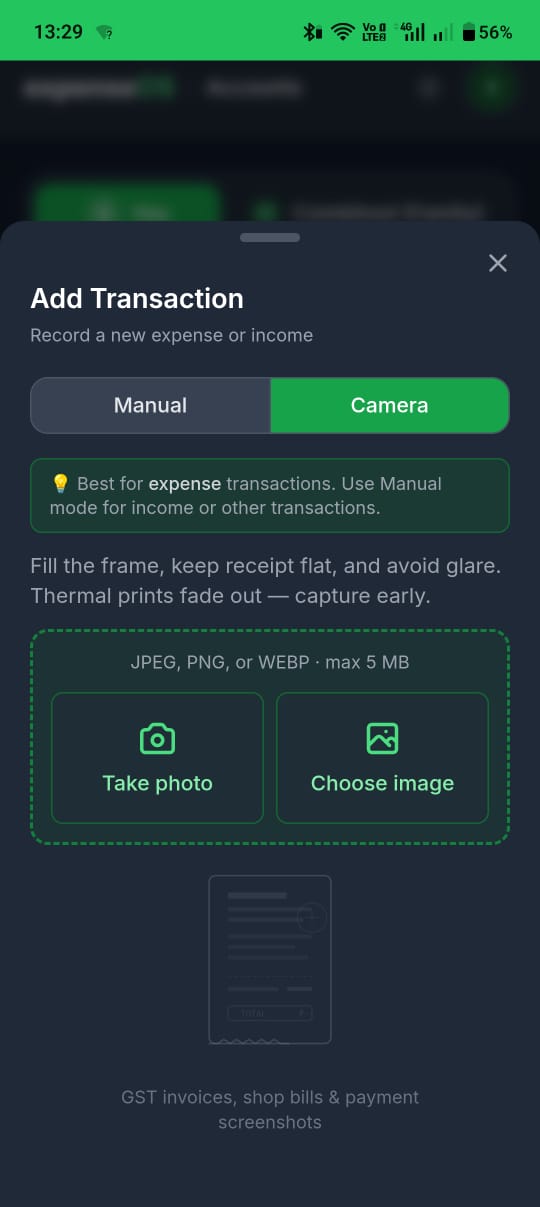
- Open Add Transaction (green +).
- Switch to the Camera pill (hidden on Free).
- Capture the receipt.
- expenseOS reads amount, merchant, etc.
- Check the form. Fix anything weird.
- Save. Nothing posts until you say so.
The photo is not kept as a permanent album. It is a scan, not a shoebox.
App Screenshot
FAQ
Does receipt scan work on the free plan?
No. The Camera pill is hidden on Free. Upgrade from Pricing.
Is my receipt photo stored?
No. It is a scan to prefill the form, not a shoebox of images on our servers.